Work
Projects
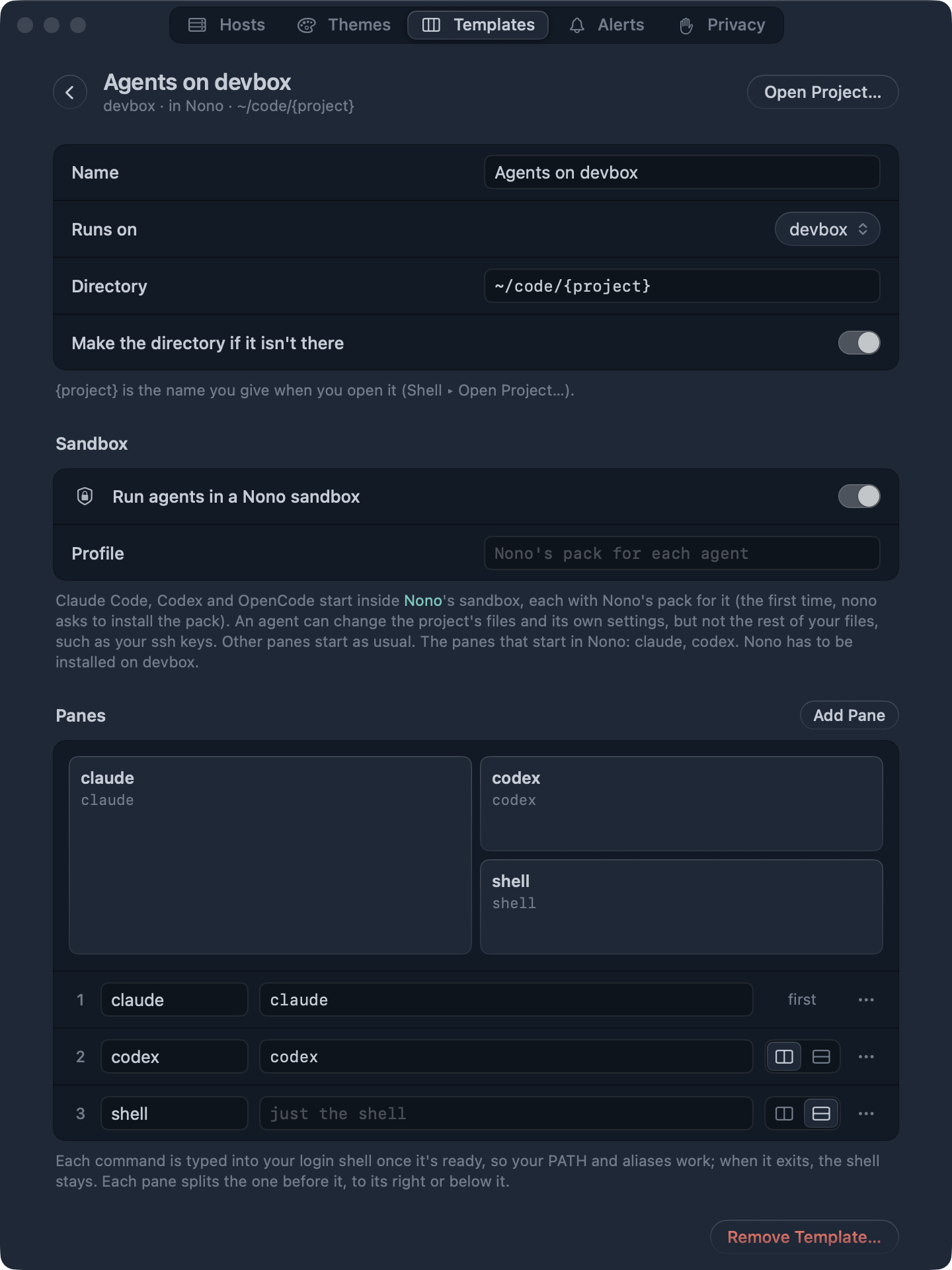
A template is a tab you open by a project’s name. Set up its panes, their commands and the machine once, then open any project into that layout with one key.
Accurate for hup Mac 0.1.483iPad and iPhone 1.1.3
Make a template
Open Settings (⌘,) and choose Templates. A template has:
| Name | What you’ll pick it by, such as “Agents”. |
|---|---|
| Runs on | This Mac, or one of your hosts. |
| Directory | Where its panes start. Write {project} where the project’s name goes, as in ~/code/{project}. |
| Make the directory | Create it when it isn’t there yet, for a project you’re starting. |
| Nono | Run agents in a Nono sandbox boxes the template’s agents in to the project. Profile is for a Nono profile of your own; leave it empty to use Nono’s pack for each agent. More about sandboxes. |
| Panes | Each has a name, a command to run, and whether it splits right or below. Leave the command empty for a plain shell. |
Commands are typed into your login shell, so your PATH and version managers are set up as in any terminal.
Open a project
Press ⇧⌘O for Open Project…, pick the template, and type the project’s name. Its panes open as one tab named after the project, each already running its command.
iPadiPhone Hold + in the tab bar and choose Open Project, or press ⇧⌘O on a keyboard.
Open it again, from anywhere
hup names each session after the project’s directory and the pane. Open the same project again and you get the sessions that are already running, where you left them, instead of new ones. That works from every device: start a project on your Mac, and open it by name on your iPad.
In a file
Mac Hosts and templates are also in ~/.config/hup/config.json, which you can edit by hand. Comments and trailing commas are fine, and hup picks up a change when you save.
{
  hosts: [
    { name: "devbox", address: "devbox" },
  ],
  templates: [{
    name: "Agents",
    host: "devbox",                   // leave it out to run on this Mac
    directory: "~/code/{project}",
    create_directory: true,
    panes: [
      { name: "claude", command: "claude" },
      { name: "codex",  command: "codex", split: "right" },
      { name: "shell",  split: "down" },
    ],
  }],
}