Work
Talk to your agent
Type or talk. hup has speech to text (STT) built in, and it runs on your device: your voice is turned into words there, and only the words go to the pane.
Accurate for hup Mac 0.1.483iPad and iPhone 1.1.3
Start talking
Mac Click the mic in a pane’s bottom right corner or the one in the title bar, or press ⇧⌘V.
iPadiPhone Tap the mic on the key bar, or press ⇧⌘V on a keyboard.
The first time, the system asks whether hup may use the microphone.
The draft
What you say appears in a draft line: in a footer under the terminal on your Mac, and in the key bar’s place on iPad and iPhone. It never covers what the program is showing. The draft is ordinary text, so fix a word, add a file name, or keep talking.
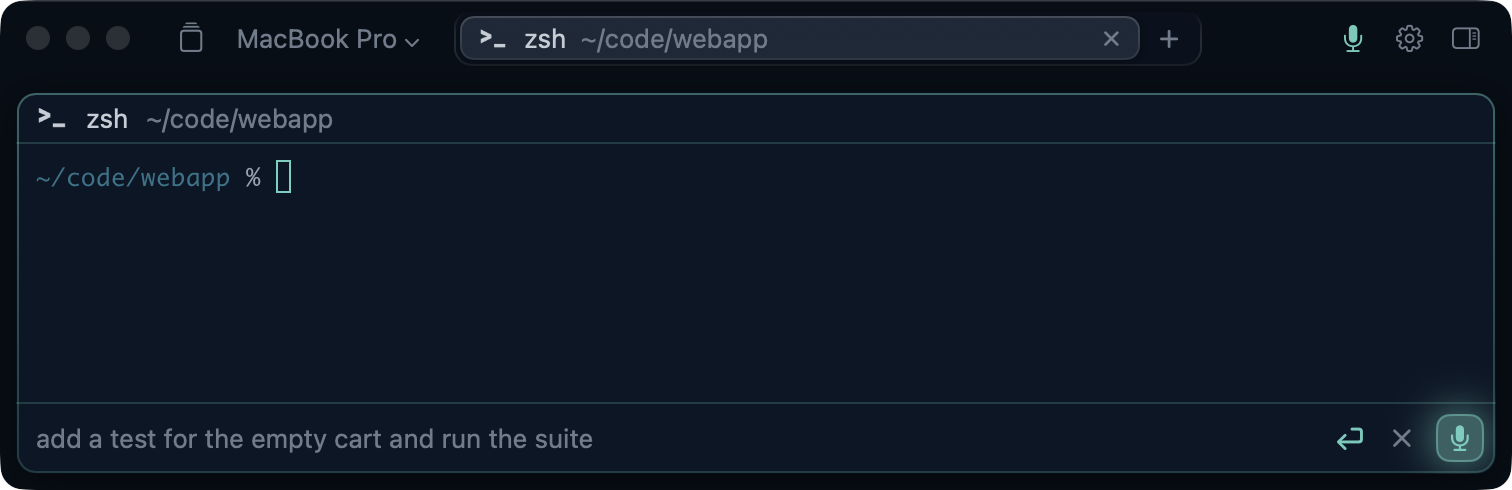
| Put the words at the prompt | ↩ |
|---|---|
| Discard the draft | esc |
Return places the words at the program’s prompt and stops there. hup doesn’t press Return in the pane for you, so you read the prompt once more and send it yourself.
Which microphone
Mac hup listens to your Mac’s sound input, the one chosen in the menu bar or in System Settings, like your other apps. Switch to a headset or a Bluetooth mic and hup uses it.
Good to know
- Talk is for prompts in plain language, which is how you speak to an agent. Shell commands are better typed: speech to text hears “up time” where you meant
uptime. - It needs macOS 26, iPadOS 26 or iOS 26.
- Recognition happens on your device. hup doesn’t send your audio anywhere.