Reference
Themes and settings
This page lists hup’s settings and where to find them, the nine themes, and the files hup keeps on your machines.
Accurate for hup Mac 0.1.483iPad and iPhone 1.1.3
Settings on your Mac
Open hup ▸ Settings… or press ⌘,. The tabs along the top are:
| Hosts | Your machines and Sprites. Add a machine. |
|---|---|
| Themes | The nine themes, below. |
| Templates | Layouts you open by a project’s name. Projects. |
| Alerts | Alerts on your phone. Alerts. |
| Privacy | Usage counts, off unless you turn them on. |
Settings on your iPad and iPhone
Open the menu under the host’s name, above the tabs, and choose Settings…, or press ⌘, on a keyboard. You’ll find your purchase, your hosts, alerts, templates, Sprites on Fly.io, themes, this device’s ssh key, and the diagnostics log.
Themes
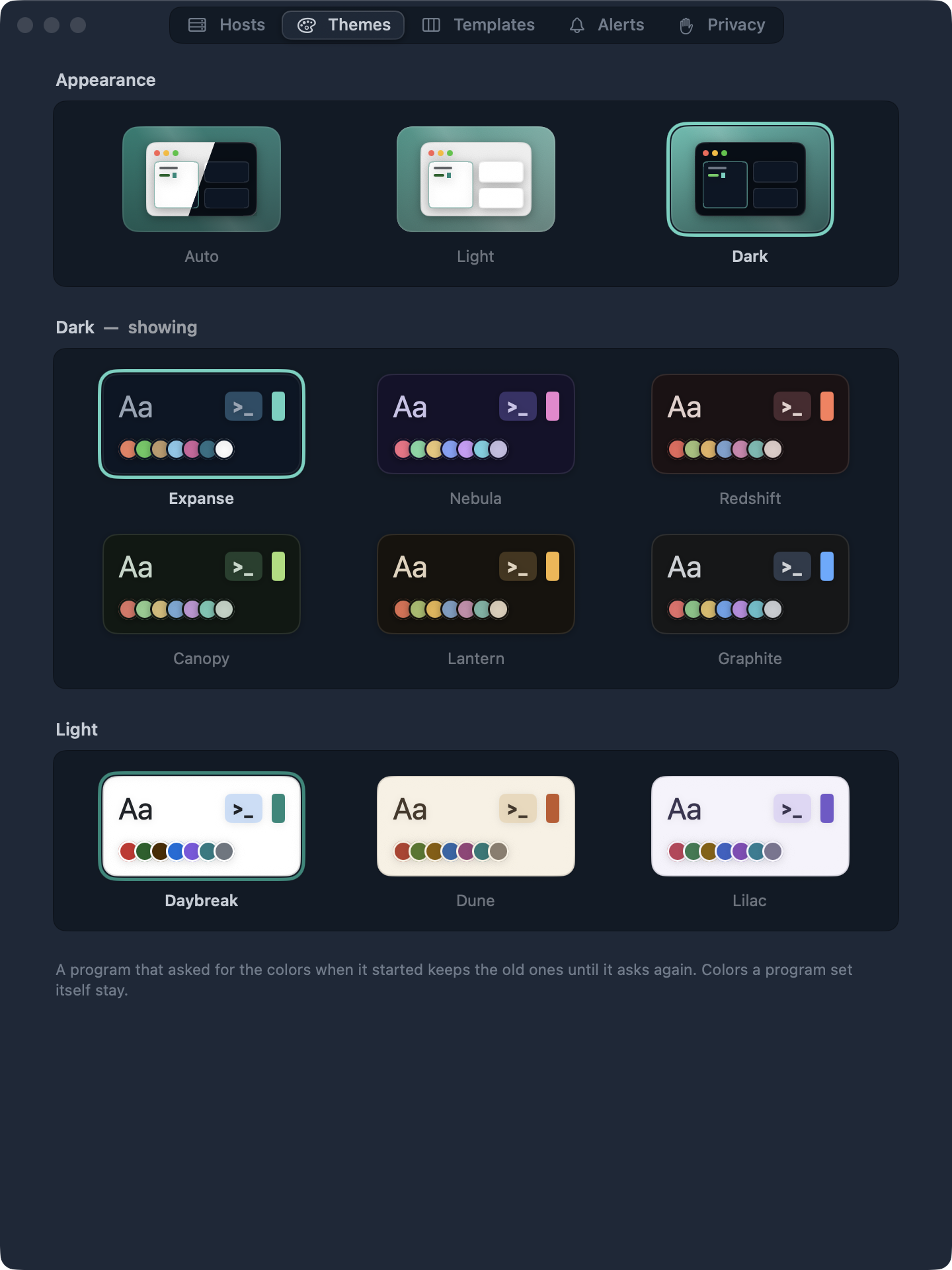
hup has nine themes. Each one colors the whole window, the terminal and the frame around it together.
| Dark | Expanse, Nebula, Redshift, Canopy, Lantern, Graphite |
|---|---|
| Light | Daybreak, Dune, Lilac |
Mac You can add a theme from another terminal. In Settings ▸ Themes, click Import a Theme… and choose a Ghostty theme file or an iTerm2 .itermcolors file, or drop the file on it. hup lists the theme with its own dark or light themes. The file gives the terminal’s colors, and hup works out the colors of the frame from them. To remove an imported theme, right-click it. An imported theme stays on the Mac that imported it.
Choose Auto to follow your system between a light theme and a dark one, or keep hup on Light or Dark. For the size of the text, use ⌘= and ⌘-, or pinch on iPad and iPhone.
Privacy
hup has no account and no server of its own, so your sessions, your notepad and your files stay between your devices and your machines.
Mac Share Usage Counts in Settings ▸ Privacy is off unless you turn it on. The same page shows exactly what would be sent, and it never includes what you run or type.
iPadiPhone hup on iPad and iPhone collects nothing.
The privacy page has the details.
Updates
Mac hup asks once whether it may check for new versions by itself, and Settings ▸ Privacy changes your choice later. hup ▸ Check for Updates… looks right away. Sessions keep running through an update.
iPadiPhone Updates come through the App Store.
What hup keeps where
| Hosts and templates Mac | ~/.config/hup/config.json |
|---|---|
| The diagnostics log Mac | ~/Library/Logs/hup/hup.log |
| hupd on a host | ~/.local/share/hup/bin/hupd |
| Files you dropped on a pane | ~/.cache/hup/dropped on the host, for seven days |
| A host’s alert settings | ~/.config/hup/alerts on the host |